

Most “best WordPress maintenance services” lists you’ll find quote prices that changed a year ago. Some still describe plans that no longer exist.
So I checked every service below on its own pricing page and compared what you actually get for the money: fixes, backups, response times, minimum terms and refunds.
Full disclosure: I’m the Lead WordPress Developer at WP Fix Fast, one of the services in this comparison. We’ve kept the same rules for every service, including ours: only what each service publishes on its own site, with a link to the source.
The short answer
Entry-level WordPress maintenance plans cost between $9 and $99 a month. The price alone tells you very little, though. The biggest difference is what happens when something breaks: some plans include fixes, some give you a set number of minutes, and some only cover updates and backups.
- Lowest price for basic care: WP Fix It, from $9 a month
- Fixes included at a low price: WP Fix Fast, from $39 a month, or $59 per one-off fix
- Guaranteed response time: FixRunner, with a one-hour response guarantee
- 24/7 support and higher-end plans: WP Buffs
- Maintenance and hosting in one bill: Fixed.net, SiteCare or Pronto Marketing
How I compared them
I started with the services that come up most often in comparison posts. I read 16 “best WordPress maintenance” lists and kept every service named in at least three of them. I also added WP Fix It and Fixed.net, because they’re our closest competitors.
For each service, I looked at:
- The starting price, billed monthly, and the yearly price where one is shown
- The price of a single fix, if you can buy one without a subscription
- What the entry plan includes when something breaks
- Backups, monitoring and security scanning
- Response time, support hours and minimum term
- Refund policy and whether hosting is included
One thing I can’t compare is the quality of the work itself, like how skilled each team is or how well they communicate. That needs real experience with each service, so I’ve stuck to what’s published. Where a detail wasn’t on the pages I read, I’ve marked it “not stated”. That doesn’t mean the service doesn’t offer it.
WordPress maintenance services compared
These services maintain your site on the hosting you already have. Prices are per site, in US dollars, billed monthly.
| Service | Starts at | One-off fix | Fixes in entry plan | Minimum term | Refund |
|---|---|---|---|---|---|
| GoWP | Free, Pro $39/mo | Not offered | AI edits; human edits only on $99 plan | Month to month | No refunds |
| WP Fix It | $9/mo | $47 site repair | Help with site-down issues | Not stated | 30-day money-back (shown on Essentials) |
| WP Fix Fast (us) | $39/mo | $59 flat | Fixes included | None | Full refund if we can’t fix it |
| Seahawk | $49/mo | Not stated | 1 task a month | Month to month | Non-refundable |
| WP SitePlan | $59/mo | Not offered | No help desk tasks | Not stated | Not stated |
| FixRunner | $79/mo | $49 | 90 minutes a month | 3 months | 30-day money-back |
| WP Buffs | $89/mo | Price not listed | 24/7 emergency support | Not stated | Not stated |
| WP Maintainer | $99/mo | $99 an hour | Up to 1 hour if their update breaks something | 2 months | Not stated |
Prices checked on November 5, 2026, on each service’s own pricing page. Prices change often, so check the linked pages before you decide.
The services in detail
GoWP
GoWP has changed a lot. Most lists still describe its old maintenance and content-edit plans, but it’s now an AI site editor combined with maintenance. The free plan gives you 5 AI edits a month, Pro ($39/month) gives you 15, and Business ($99/month) gives you 50.
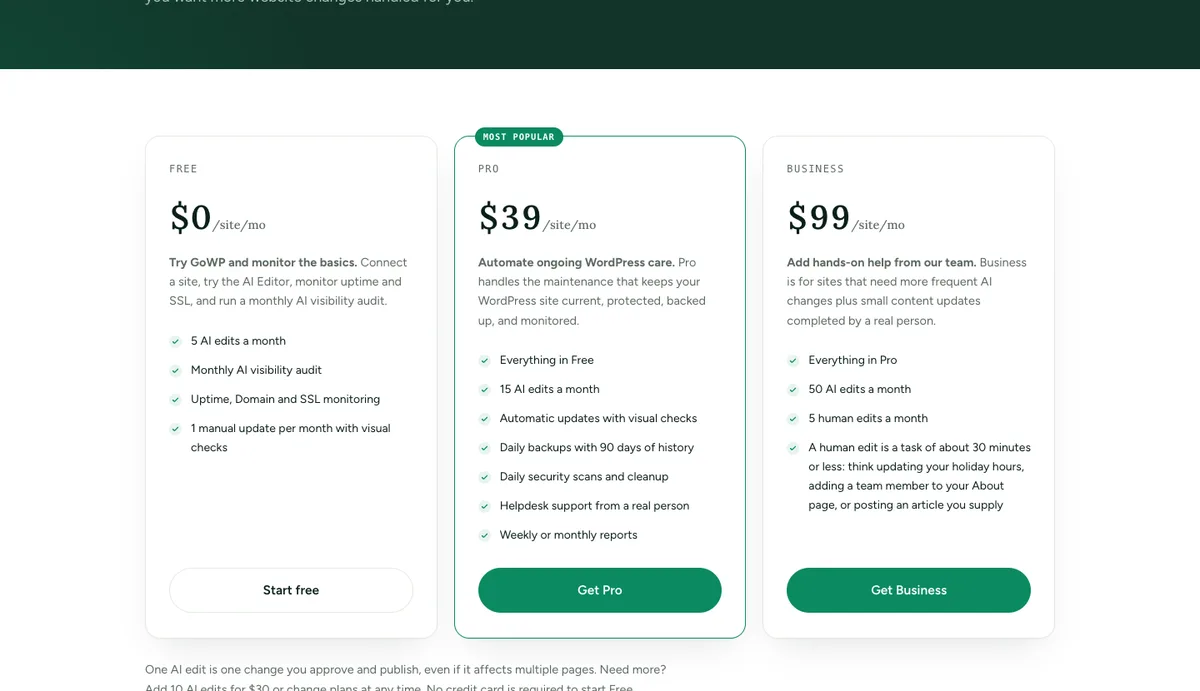
- Daily backups with 90 days of history on Pro and Business
- Daily security scans and malware cleanup on Pro and Business
- Human edits only on Business: 5 a month, about 30 minutes each
- Month to month, cancel from the dashboard
Worth knowing: its terms say there’s no guaranteed response or completion time, and unused billing periods aren’t refunded (GoWP pricing).
Best for: site owners who want to make small content changes themselves with AI help.
WP Fix It
WP Fix It is best known for its one-off fixes, and it has the lowest care plan prices in this comparison. Essentials costs $9/month ($84/year) and Beast Mode costs $27/month ($264/year).
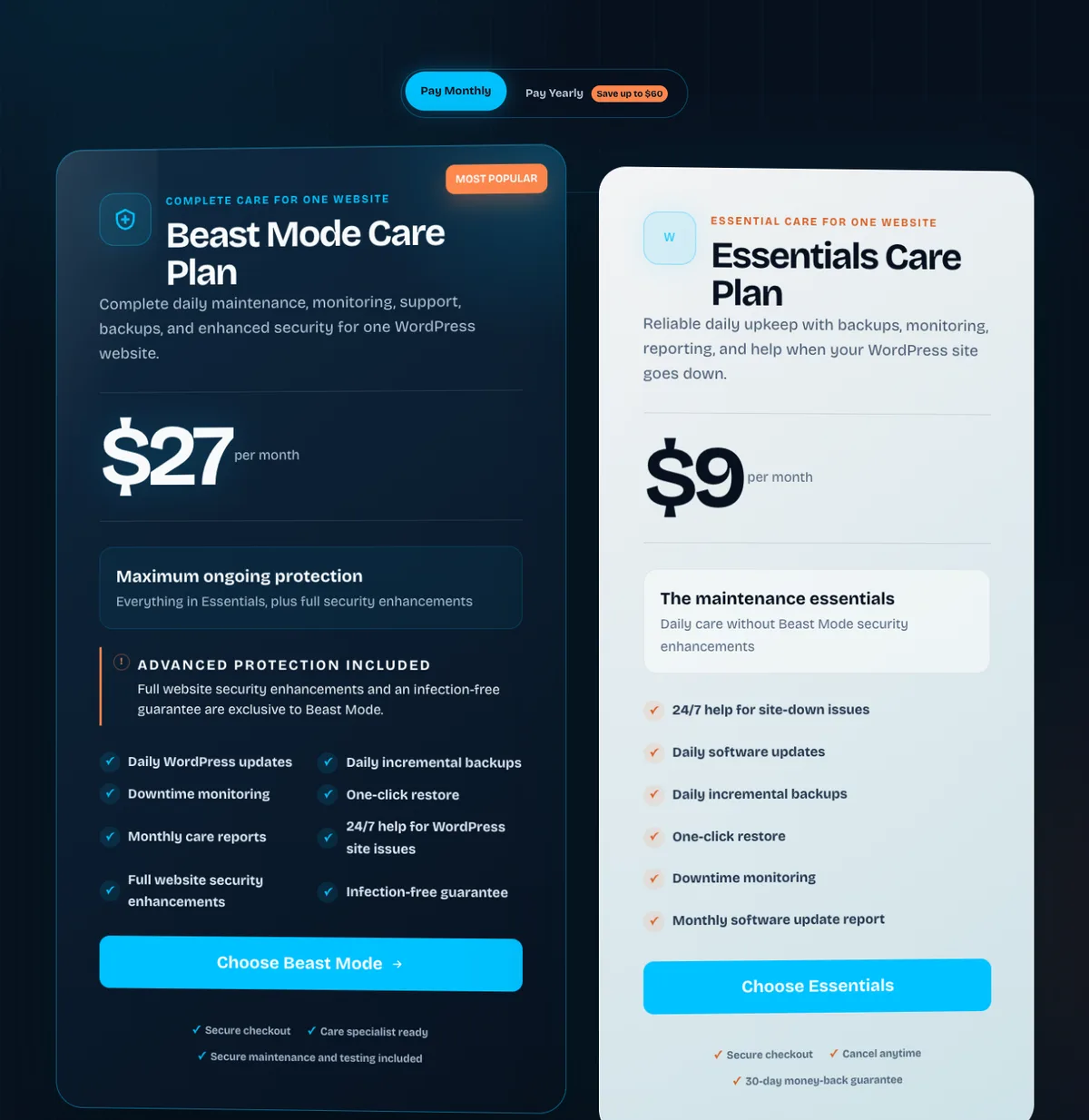
- Daily updates, daily incremental backups and one-click restore on both plans
- Downtime monitoring and monthly reports
- Essentials: 24/7 help for site-down issues. Beast Mode: 24/7 help for WordPress site issues, plus security enhancements and an infection-free guarantee
- One-off services, including site repair from $47, malware removal from $137 and speed optimization from $167
Worth knowing: “Cancel anytime” and the 30-day money-back guarantee appear only on the Essentials card, and the page doesn’t say what counts as a “site issue” on Beast Mode. Other tasks are paid hourly (WP Fix It care plans).
Best for: the lowest monthly price for updates, backups and downtime monitoring.
WP Fix Fast
This is our service, so read this section with that in mind. Our maintenance plans start at $39/month (Care), with Unlimited at $99/month and Performance at $189/month. Yearly billing gives you two months free.
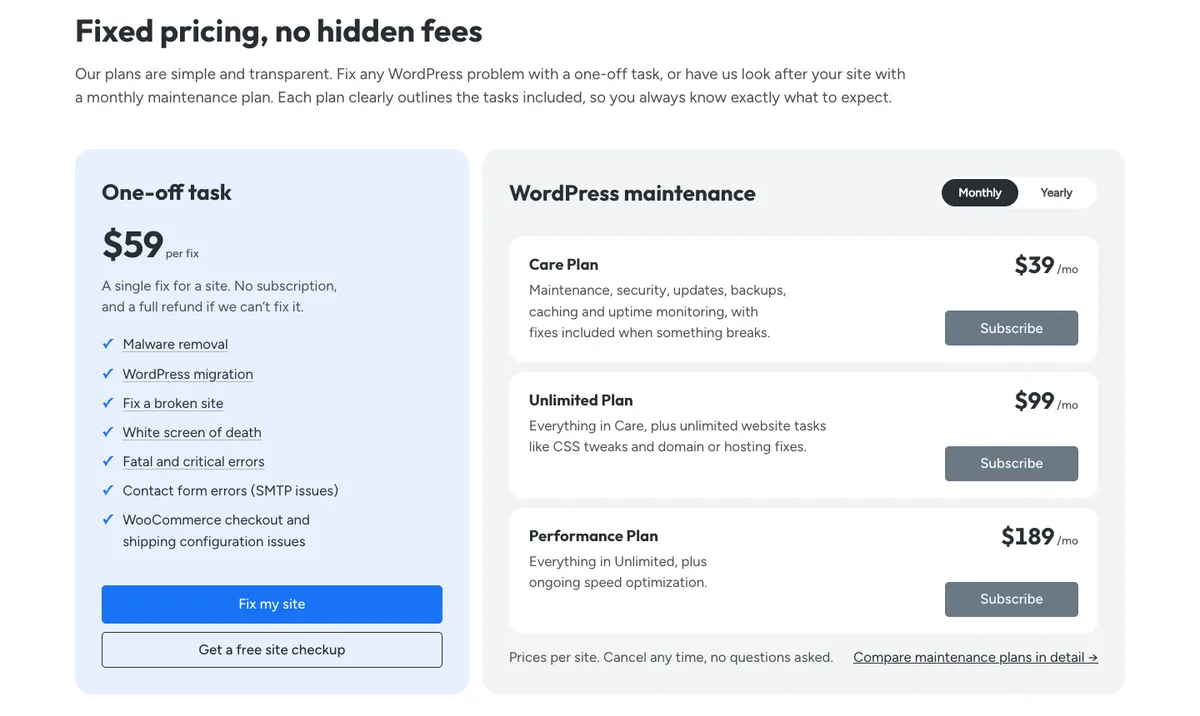
- Fixes included on every plan when something breaks, including malware removal and migrations
- Updates, daily off-site backups, uptime monitoring and security checks
- One-off fixes at a flat $59, with no subscription
- No minimum term, cancel any time
Worth knowing: we don’t guarantee a resolution time because WordPress issues can be very diverse by their nature. Most common errors (such as white screen of death, PHP memory limit or compatibility issues) are fixed within an hour, and most malware removals and site migrations are done the same day. If we can’t fix an issue, you get a full refund. Speed optimization is only included in the Performance plan (WP Fix Fast pricing).
Best for: all types of WordPress fixes, malware removal and migrations at one flat price, or included in a low-cost plan. Free site check available for WordPress site owners who can not identify what’s wrong with their websites.
Seahawk
Seahawk has four website care plans, and each one spells out its limits clearly: Essentials ($49/month), Pro ($99), Business ($299) and VIP ($599). Yearly prices are $499, $999, $2,999 and $5,999.

- Essentials: 1 task a month, daily backups kept for 30 days, uptime checks every 15 minutes
- Resolution within 2 business days on Essentials, 1 business day on Pro and Business
- Daily security scans on all plans
- Off-site cloud backups
Worth knowing: support runs during business hours on weekdays (24/7 triage on VIP only), and its terms say fees are non-refundable (Seahawk website care).
Best for: site owners who want clear, written limits for every plan.
WP SitePlan
WP SitePlan bills monthly, per site: Essentials ($59/month), Professional ($119) and Enterprise ($229).
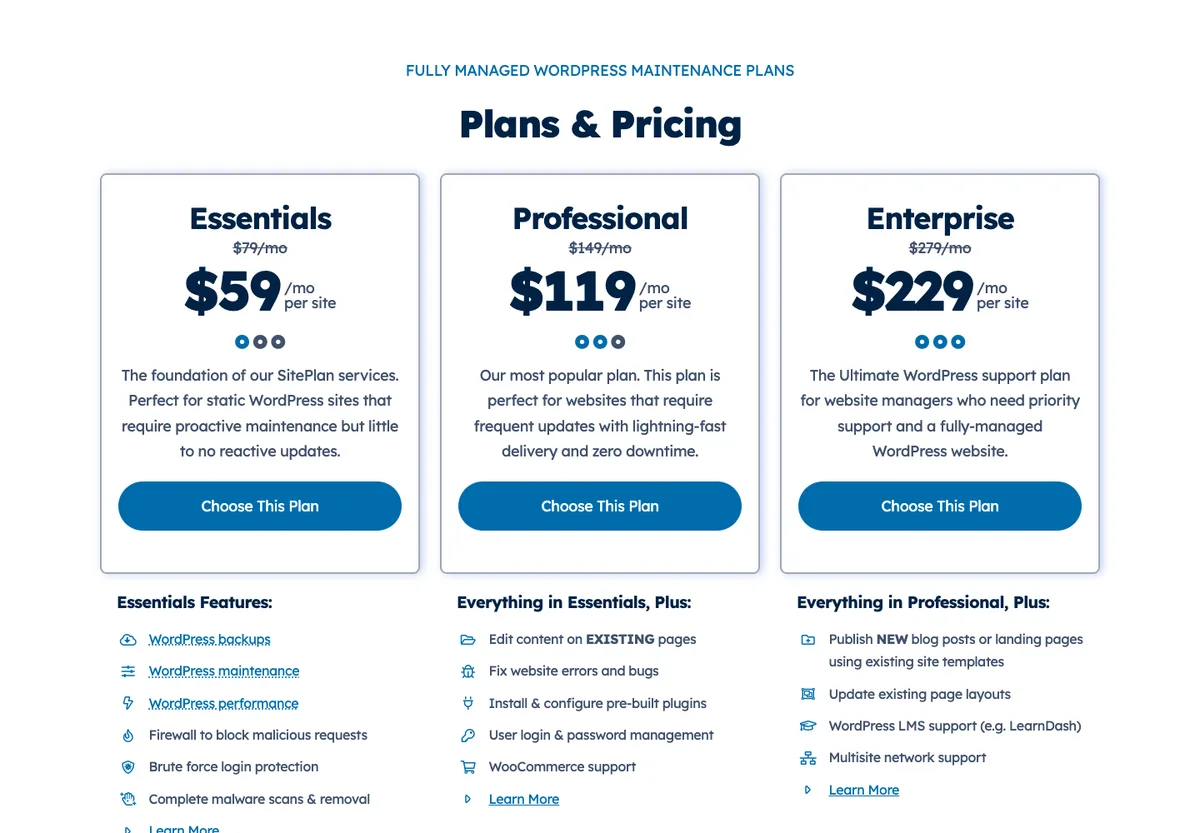
- Daily backups with one-click restore, uptime monitoring, and malware scans and removal on all plans
- No help desk tasks on Essentials
- Professional adds help desk tasks of about 30 minutes each, bug fixes and edits
- Enterprise adds unlimited requests, new posts and landing pages
Worth knowing: help desk requests are answered within 1 to 2 business days, Monday to Friday. I couldn’t find cancellation or refund terms on its pricing or terms page (WP SitePlan pricing).
Best for: sites that only need updates, backups and security, with no regular changes.
FixRunner
FixRunner sells support time: Premium gives you 90 minutes a month, Rocket 120 and Advance 240. Billed monthly, they cost $79, $119 and $199. Quarterly billing lowers that to $69, $99 and $169, and yearly billing to $59, $89 and $149 a month.
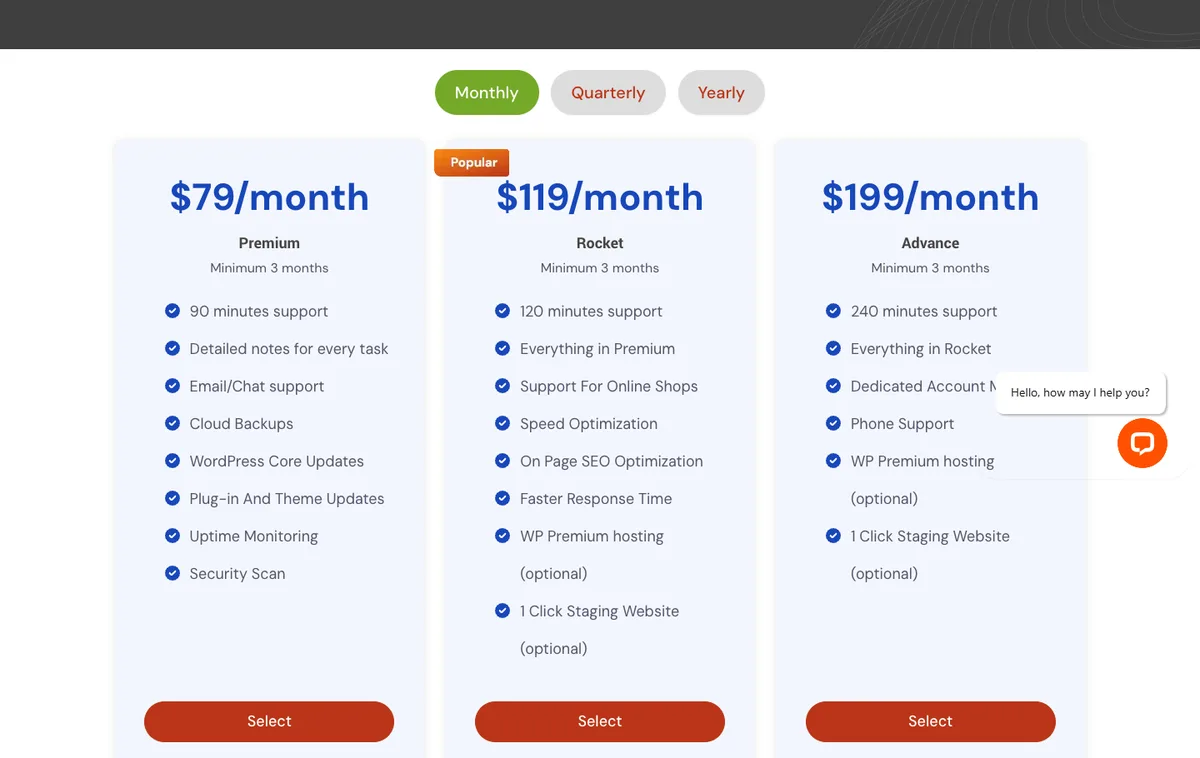
- Guaranteed one-hour response, with standard tickets resolved within 24 hours
- Daily cloud backups, uptime monitoring and security scans
- Unused minutes roll over within the quarter
- One-off fixes for $49, paid after the issue is resolved
Worth knowing: many lists quote $69, but that’s the quarterly rate. There’s a 3-month minimum (12 months on yearly billing), even though the FAQ also says you can cancel any time. A 30-day money-back guarantee applies (FixRunner plans).
Best for: a guaranteed response time and a set amount of developer time each month.
WP Buffs
WP Buffs is mentioned in almost every comparison list. Its plans are Maintain ($89/month), Protect ($179), Perform ($239) and Custom ($359), with no yearly option shown.
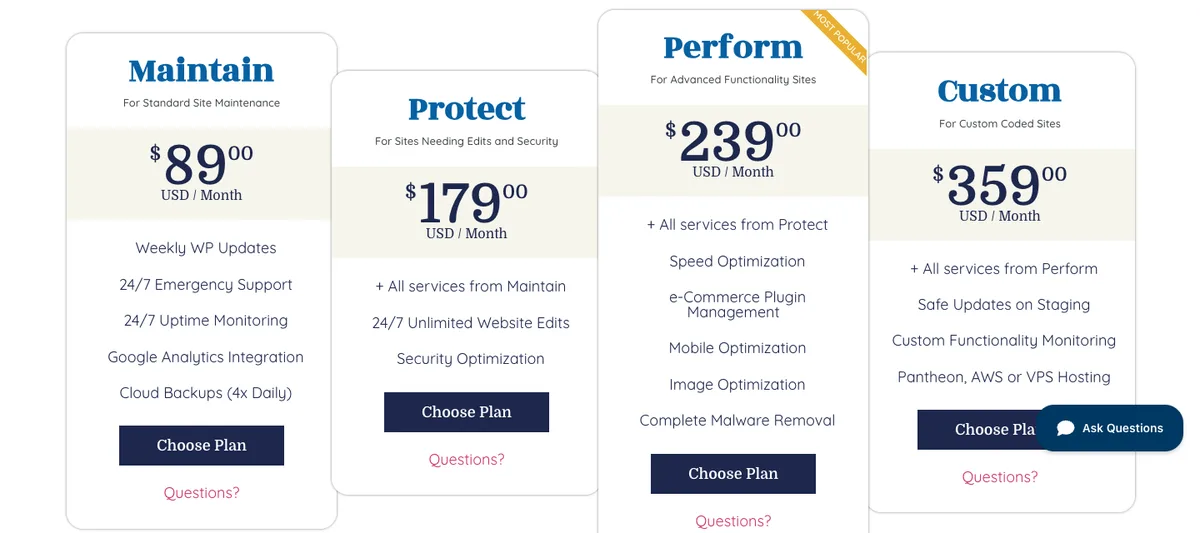
- Cloud backups four times a day and uptime monitoring
- Maintain includes 24/7 emergency support
- Unlimited 24/7 website edits from Protect
- Complete malware removal only from Perform
Worth knowing: support is by email only, according to its FAQ. Response times, cancellation and refund terms aren’t stated on the plans page (WP Buffs plans).
Best for: businesses that want 24/7 support and unlimited edits, and have the budget for it.
WP Maintainer
WP Maintainer keeps it simple with a single plan at $99/month per site, plus optional add-ons for performance ($12/month) and a security firewall ($49/month).
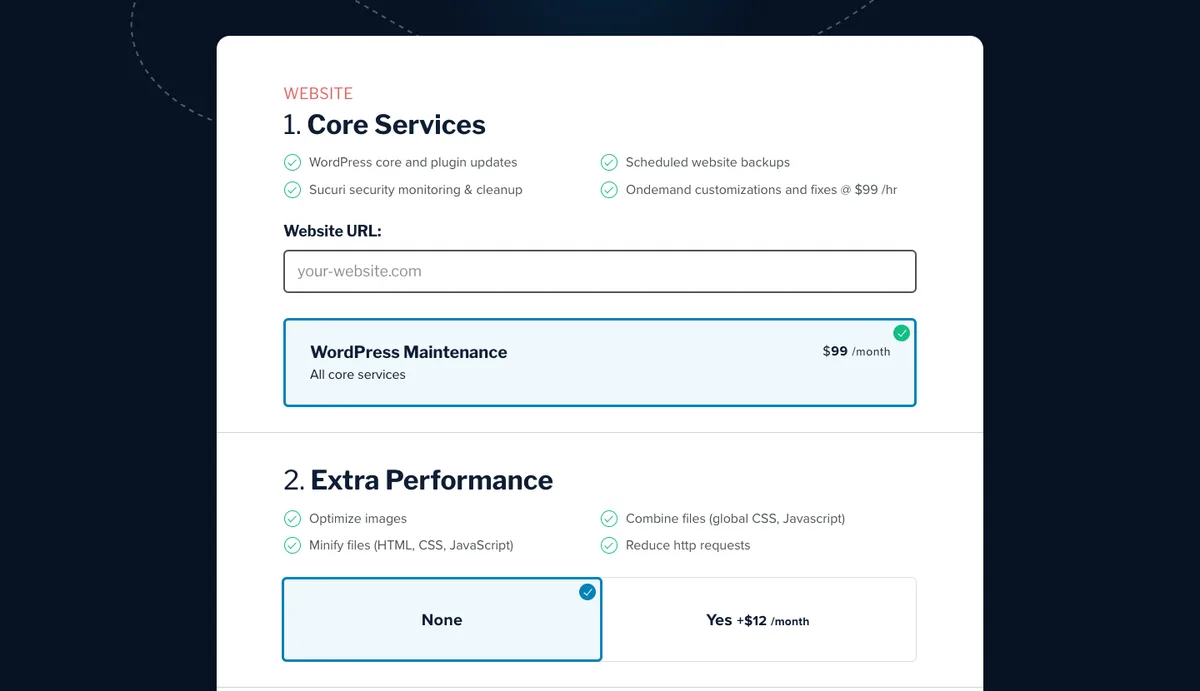
- Updates, backups and Sucuri security monitoring and cleanup
- Up to 1 hour of troubleshooting or rollback if one of their updates breaks something
- Other work at $99 an hour
- Cancel any time after the first 2 months
Worth knowing: non-emergency requests can take up to 48 hours, and multisite isn’t supported (WP Maintainer pricing).
Best for: site owners who want one straightforward plan with Sucuri security.
Maintenance plans that include hosting
These services bundle hosting with maintenance, so you can’t compare their prices directly with the table above. If you’re happy with your current host, a maintenance-only service is usually cheaper.
Fixed.net
Fixed.net offers Care ($49/month), Unlimited ($99) and Complete ($209), billed monthly. Billed yearly, they cost $39, $79 and $189 a month. All plans include hosting, but Care and Unlimited can also maintain a site hosted elsewhere. Complete requires hosting with Fixed.net.
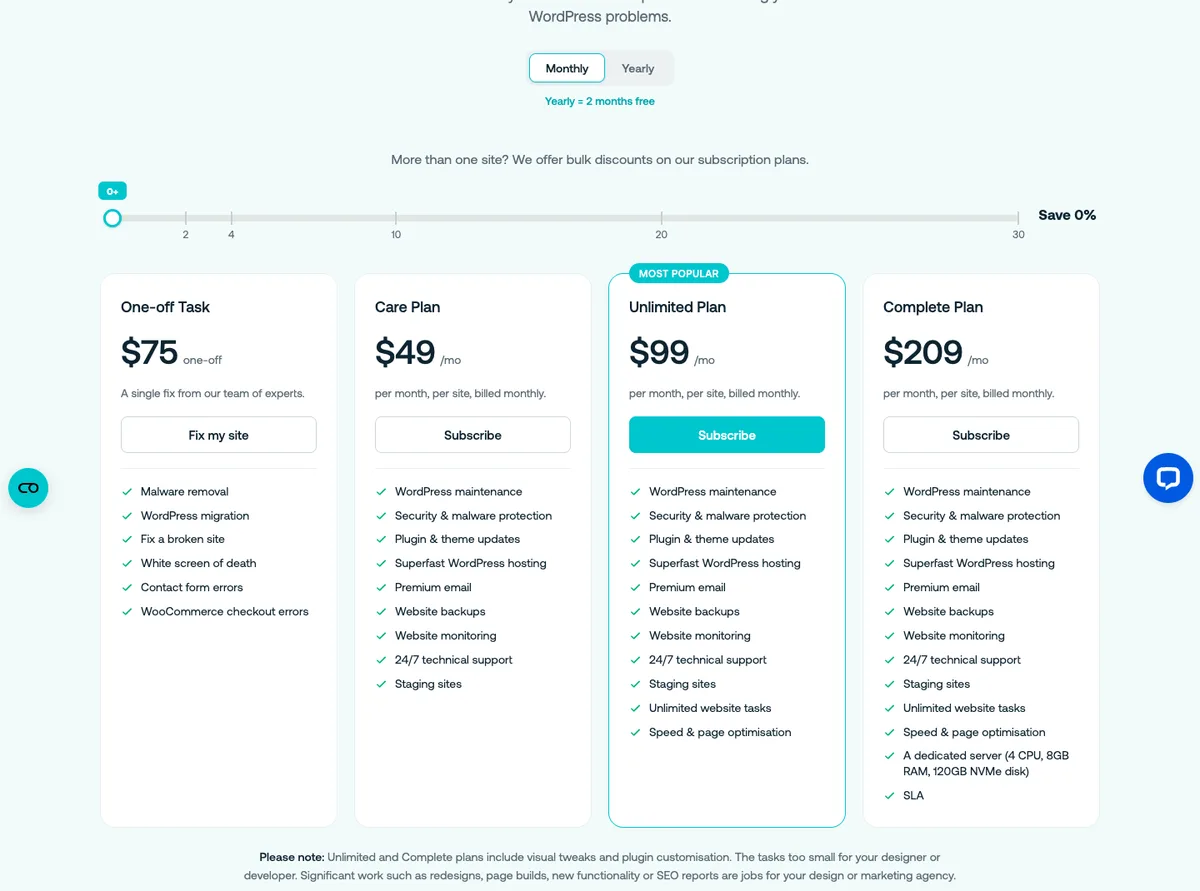
- Fixes for broken sites, malware removal, WordPress errors, contact form errors and broken checkouts on all plans
- Backups twice a day and 24/7 support
- Guaranteed response within four hours on Complete only
- One-off fixes for $75
Worth knowing: plans are rolling monthly with no minimum term and a 30-day money-back guarantee. Multi-site discounts apply to Care and Unlimited (Fixed.net pricing).
SiteCare
SiteCare (Maintainn now redirects here) appears in every comparison list I read. Its pricing page shows Gold ($435/month) and Diamond ($2,190/month), both with SiteCare’s own hosting. Its homepage FAQ mentions a Silver plan from $95/month for maintenance on your current host, but Silver isn’t on the pricing page.

- Gold: 5 content edits and 5 quick fixes, daily backups
- Diamond: 10 content edits, unlimited quick fixes, real-time backups and a one-hour SLA
- Month to month, with a 30-day money-back guarantee on all plans
Worth knowing: the support team works weekdays from 9am to 5pm ET, with after-hours urgent support on Diamond only (SiteCare pricing).
Pronto Marketing
Pronto Marketing bundles maintenance with Google Cloud hosting: Technical Support ($99/month), Website Support ($299) and Dedicated Support ($799). An annual contract saves 10%.
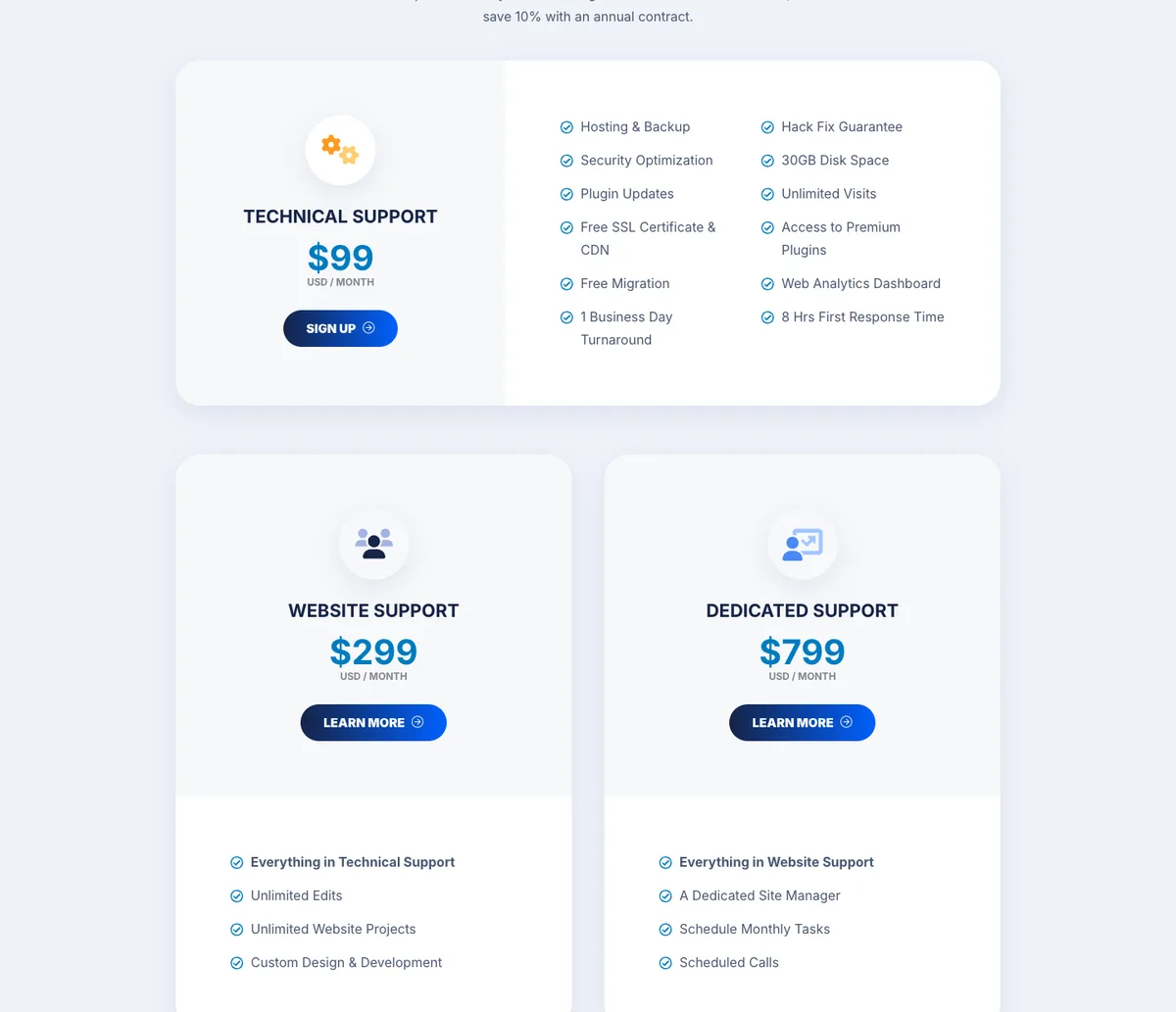
- Broken-site fixes on Technical Support, unlimited edits from Website Support
- Automated daily backups and uptime monitoring
- 8-hour first response and 1 business day turnaround on Technical Support
- Hack-fix guarantee while hosted with Pronto
Worth knowing: month-to-month plans are available, but cancellation steps and a money-back policy aren’t stated (Pronto Marketing).
Other options worth knowing
Valet and WP Tech Support both show up in comparison lists, but neither publishes prices on the pages I read. You request a quote instead. WP Tech Support has four plans with daily off-site backups on AWS and a 3-month minimum term. Valet asks for six months and 30 days’ notice to cancel.
Codeable is a freelancer marketplace, not a maintenance service. Developers charge an estimated $80 to $120 an hour, plus a 17.5% service fee, and you pay per project. It’s a good fit for one-time projects, but there’s no ongoing monitoring or backups.
How to choose a WordPress maintenance service
After fixing close to 1,000 WordPress issues since 2018, I can tell you that the cheapest plan isn’t always the cheapest option. A $9 plan that doesn’t cover the fix you need can end up costing more than a plan that does.
Before you sign up, ask these questions:
- What happens when my site breaks? Are fixes included, capped in minutes or tasks, or charged extra? This matters more than anything else.
- Is malware removal included? Some plans include it on every tier, others only on the most expensive one, and others charge for it separately.
- How often are backups taken, and where are they stored? Daily off-site backups are the minimum. Backups stored on the same server can be lost with the site.
- How fast do they respond? A guaranteed response time is rare. If there’s no guarantee, look for what they say about typical response times.
- Is there a minimum term? Some services ask for 2, 3 or 6 months, even when they say you can cancel any time.
- What’s the refund policy? A money-back guarantee, a refund only if they can’t fix it, or no refunds at all.
- Do I need to move my hosting? Bundled plans can be convenient, but switching hosts adds a migration and makes it harder to leave later.
- Who will work on my site? Check whether the provider names its developers and whether you can verify their experience, for example through a WordPress.org profile or published plugins.
If you’re not sure what’s wrong with your site yet, start with our guide to common WordPress errors. Many problems can be fixed without a monthly plan.
Frequently asked questions
How much does WordPress maintenance cost?
Among the services in this comparison, entry-level maintenance plans cost between $9 and $99 a month, and most fall between $39 and $99. Plans that include hosting start at around $49 to $99 a month. A single one-off fix costs between $47 and $75.
What are some reputable WordPress maintenance companies?
The services named most often across 16 comparison lists were SiteCare, WP Buffs, GoWP and FixRunner. Valet, Seahawk, WP SitePlan, WP Tech Support, WP Maintainer and Pronto Marketing also appeared in three or more lists.
Is a WordPress maintenance plan worth it?
For a business site, usually yes. Most hacked WordPress sites run an outdated plugin or theme, and a plan covers updates, backups and monitoring for about the price of one emergency fix. For a small personal site, one-off fixes when something breaks may be enough.
Should I choose a monthly plan or pay per fix?
Pay per fix if your site rarely has problems and you’re comfortable handling updates yourself. Choose a monthly plan if you’d rather not think about updates and backups, or if your site makes you money and downtime would hurt.
Can I keep my current host?
Yes, with most maintenance-only services. Plans that bundle hosting, like Fixed.net’s Complete plan, SiteCare’s Gold and Diamond plans, and Pronto Marketing, require you to host with them.
What should a WordPress maintenance plan include?
At a minimum: core, plugin and theme updates, daily off-site backups, uptime monitoring and security scanning. The best plans also include fixes when something breaks, so you’re not paying extra every time there’s a problem.
Final thoughts
There’s no single best WordPress maintenance service. The right one depends on your budget, how often your site needs changes, and what you expect when something breaks.
Compare what’s included in the entry plan, not just the price, and check the minimum term and refund policy before you sign up.
One more thing worth checking: who will actually work on your site. Many maintenance providers don’t name their developers, so you can’t verify their experience. Look for a team that shows who they are and where you can see their work, like a WordPress.org profile, published plugins or contributions to WordPress itself.
For example, I’m a member of the WordPress Test Team and contribute to WordPress core, which means I test new WordPress releases before they reach your site. You can see my contributions on my WordPress.org profile.
If you’d like fixes included without paying for hours or tasks, take a look at our WordPress maintenance plans, or let us fix your WordPress site with a one-off task.
Disclaimer: WP Fix Fast is one of the services compared in this article. All prices and plan details come from each service’s own website, checked on November 5, 2026, and may change at any time. Always check the current pricing page before signing up.