

Complianz is a popular cookie consent plugin, but its cookie banner can slow down your site’s Largest Contentful Paint (LCP), especially on mobile, which hurts your PageSpeed Insights results and Core Web Vitals. The fix is to keep the banner hidden until the visitor’s first scroll, click, tap or key press, so it isn’t measured as your LCP element.
What is LCP and why does it matter?
Largest Contentful Paint (LCP) measures how quickly the main content of a webpage becomes visible to visitors. It is one of the key metrics in Google’s Core Web Vitals, which affect your SEO rankings and user experience, and Google considers an LCP of 2.5 seconds or less good. A faster LCP means visitors see your content sooner, reducing bounce rates and improving engagement.
How Complianz affects your LCP score
Complianz renders its cookie banner with JavaScript, so it often appears after your hero image or headline. Because the banner covers a large part of the screen on mobile, the browser counts it as the largest element and reports its late render time as your LCP.
The problem is more noticeable on mobile, where slower processors and network speeds delay the banner even more.
How to fix the Complianz LCP issue
To fix the Complianz LCP issue, hide the cookie banner on page load and show it as soon as the visitor scrolls, clicks, taps or presses a key, or after 5 seconds if there’s no interaction (you can change this in the code). Our snippet below does exactly that.
Chrome stops measuring LCP once the visitor interacts with the page, so the banner can no longer become the LCP element, and your hero content gets measured instead.
This significantly improves your LCP score and overall Core Web Vitals metrics without sacrificing compliance. Complianz still blocks tracking scripts until the visitor consents, so delaying the banner doesn’t affect compliance.
Adding the code to your site
The fix is a short PHP snippet that wraps the Complianz banner in a hidden container and adds a small script that reveals it on the first interaction. Add the following code snippet to your WordPress website by either adding it to your child theme’s functions.php file or using the Code Snippets plugin.
function cmplz_delay_banner() {
  ob_start();
  ?>
<script>
document.addEventListener("cmplz_cookie_warning_loaded", function () {
    const wrapper = document.querySelector("#cmplz-custom-wrapper");
    if (!wrapper) return;

    const events = ["scroll", "click", "keydown", "touchstart"];
    const show = () => {
        wrapper.classList.remove("cmplz-hidden");
        events.forEach((e) => window.removeEventListener(e, show));
        clearTimeout(timer);
    };

    events.forEach((e) => window.addEventListener(e, show, { once: true, passive: true }));
    // Fallback: show the banner after 5 seconds even without interaction
    const timer = setTimeout(show, 5000);
});
</script>
<?php
  $script = ob_get_clean();
  $script = str_replace(array('<script>', '</script>'), '', $script);
  wp_add_inline_script('cmplz-cookiebanner', $script);
}
add_action('wp_enqueue_scripts', 'cmplz_delay_banner', PHP_INT_MAX);

// Make the cookie banner hidden by default
function wpff_wrap_cookiebanner_with_custom_div($html) {
  return '<div id="cmplz-custom-wrapper" class="cmplz-hidden">' . $html . '</div>';
}
add_filter('cmplz_banner_html', 'wpff_wrap_cookiebanner_with_custom_div', 9999);Alternatively, you can download this code, save it into your /wp-content/mu-plugins/ folder as complianz-display-after-scroll.php to run it as a must-use plugin.
Testing the impact
To test the impact, run your page through Google PageSpeed Insights or DebugBear before and after applying the fix and compare the LCP values. You should see a noticeable reduction in LCP time, especially on mobile. If your lab LCP still shows the banner, raise the fallback delay (5000 milliseconds in the code). To confirm the fix is active, you can also check the banner’s wrapper in Chrome DevTools, as shown below.
Right click anywhere on one of your pages and click Inspect.
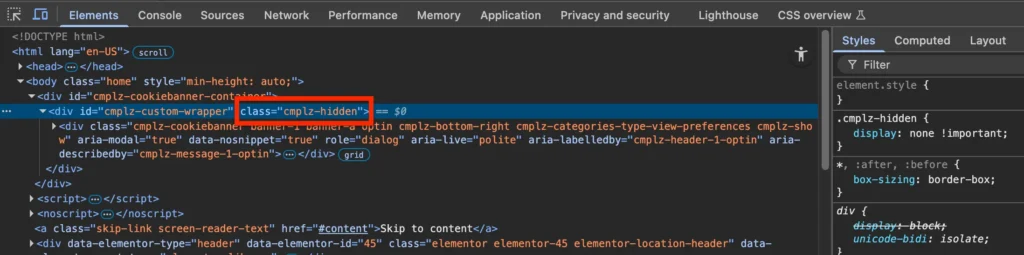
Scroll through the elements, and close to the top, you should see the div with the id cmplz-cookiebanner-container.
Our fix adds a second wrapper to the div with the class cmplz-cookiebanner and makes it hidden by adding the cmplz-hidden class.
Using JavaScript, we wait for the visitor’s first scroll, click, tap or key press (or 5 seconds, whichever comes first). Then the cmplz-hidden class is removed, and the cookie banner becomes visible.
Additional tips to improve website speed
The Complianz fix removes one cause of a slow LCP, but most WordPress sites have a few more. These general tips help keep your Core Web Vitals in good shape after the fix, from caching and a CDN to image optimization and removing plugins you no longer use:
- Tracking your Core Web Vitals regularly helps ensure your site stays fast and user-friendly.
- Use caching plugins, such as LiteSpeed Cache and a content delivery network (CDN) like Cloudflare to reduce TTFB and speed up your site.
- Optimize images and defer non-critical JavaScript.
- Avoid plugin bloat by removing unused plugins that are installed on your WordPress website.
- If you use Elementor, also check that your hero image isn’t lazy-loaded. See our Elementor LCP fix.
Conclusion
Complianz can slow down your LCP and Core Web Vitals, but this simple fix can make a big difference. By delaying the cookie banner until the visitor’s first interaction, you keep it from becoming the LCP element, while Complianz still blocks tracking scripts until consent, so your site stays both fast and compliant.
Need a hand with Core Web Vitals? Our WordPress speed optimization service covers it.